Verifying the end-to-end workflow with an
AI-assisted prototype

MY ROLE
Product designer, AI prototyper
TIMELINE
May-June 2026
BUILT WITH
Claude Code, Figma MCP, Figma Console MCP, React, Vite, Vercel, GitHub
CHALLENGE
RESULTS
Working React app on real data
Complete workflow
home, table, and dashboard, connected
EXPECTED IMPACT
Workflows validated on real data, before development
New features testable in minutes
Clear handoff — design plus working code
PROBLEM DISCOVERY
User interviews and design reviews revealed that validating scientific workflows requires live interactions and real data
Two patterns kept surfacing in testing and design reviews, both pointing to the same gap.
Scientists couldn't help reading the data. Shown a new filter on placeholder numbers, they'd question why a sequence appeared or whether a count was right — auditing the sample instead of judging the workflow.
Developers asked the opposite question: how would the feature connect to the rest of the resource — the table, the charts, the other filters? Standard Figma UI prototypes couldn't show that.
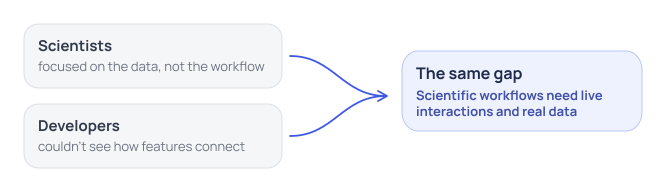

Two patterns pointing to the same gap
SUCCESS METRICS
A live prototype researchers can test and developers can build on
The prototype focused on three key goals:
01
Faithful to the design system
Rebuild from the existing Figma components, so it looks and behaves like the real platform
02
Running on real data
Drive every table, chart, and filter from real sequence data, so scientists test the workflow instead of auditing placeholders.
03
Easy to edit and share
Add or change a feature and test it as soon as it's needed — no redesign-and-build cycle in between.
APPROACH
Directing Claude Code to build a working prototype from existing designs
I rebuilt the Figma design as a working web app with Claude Code — an AI agent that writes and runs code. Three decisions made it work:
01
Provided detailed project documentation to Claude Code
Claude Code builds from the files in the project, so I organized everything it would work from: a project-spec markdown consolidating the behavioral details, dev notes on each component in Figma, and custom skills installed in the project — covering the goals, the users, the design system, and how every component should behave.
02
Connected Claude Code to the Figma file through two MCP servers
The official Figma MCP was the source of truth — reading token values and the layer tree from Figma's cloud, plus screenshots to check each built component against the design. But requests for large component sets failed or came back incomplete, so Figma Console MCP covered the gap: running as a plugin inside the desktop app, it read properties straight off the node and exposed every interaction state a placed instance can't show.
03
Prepared real-life data to connect to the interface
I downloaded one small real dataset (2,713 sequences), as well as AI-generated synthetic dataset to match a 14-million-sequence scale, so charts and table behaved realistically.
04
Prompted Claude Code to build one component at a time
- from smallest to largest - then assembled them into the larger screens, checking and debugging each development cycle. Each component was built and reviewed in isolation on a dedicated workbench page before being composed into a screen.


The AI-assisted build method
DESIGN SHIFTS
Discovering hidden UI requirements through connected interfaces and real data
Once the prototype ran on real data and worked as a live system, changes surfaced that the static design couldn't have revealed:
Added a taxonomy tree view — I built it from existing components to sit alongside the sunburst, a view the original Figma design didn't have.
Made the time charts fluid — the collection and release charts now shift between yearly, monthly, and daily intervals depending on the selection, instead of the separate tabs the static design used.
Moved search above the tabs — with both tabs holding real records, one search bar could query both at once, replacing the per-tab search in the original design.
Explore the key design changes from AI prototyping
LEARNINGS
AI-assisted prototyping takes constant direction and close attention
Begin with complete context - My first AI prototyping attempt fell short: I gave Claude Code no real background on the project before starting. The result was generic and disregarded my design system. Preparing thorough documentation first corrected this.
Prompt for one component at a time - Claude Code tends to work non-stop trying to finish the whole project in one pass. So I prompted it to build a single component, pause, and wait for my approval before moving on. Building small components first is what kept the prototype faithful to the design.
Review every change closely - The work required continuous debugging, and resolving one issue often introduced another — so each change demanded careful review before I moved forward.
OTHER WORK
Other NCBI Virus Projects
A collection of my design work for the NCBI Virus resource