Optimizing a complex genomic data table for data analysis

MY ROLE
Product designer
TIMELINE
January 2024 - August 2025
TEAM
1 product owner, 2 developers, 3 experts
CHALLENGE
RESULTS
+ 38%
underused filter adoption
+ 34%
increase in filter usage
+ 8%
EXPECTED IMPACT
Reduced search and download errors
Reduced filter-related support tickets
Enhanced platform reputation
From cluttered to clear
Before

After

PROBLEM DISCOVERY
Data analytics revealed disorganized filters, poorly-ordered columns, and wasted space
01
Random filter order:
25+ filters with no logical structure — high-usage ones buried mid-list, rarely-used ones at the top.
02
Column confusion:
Default column order didn't match researcher priorities, forcing constant reordering.
03
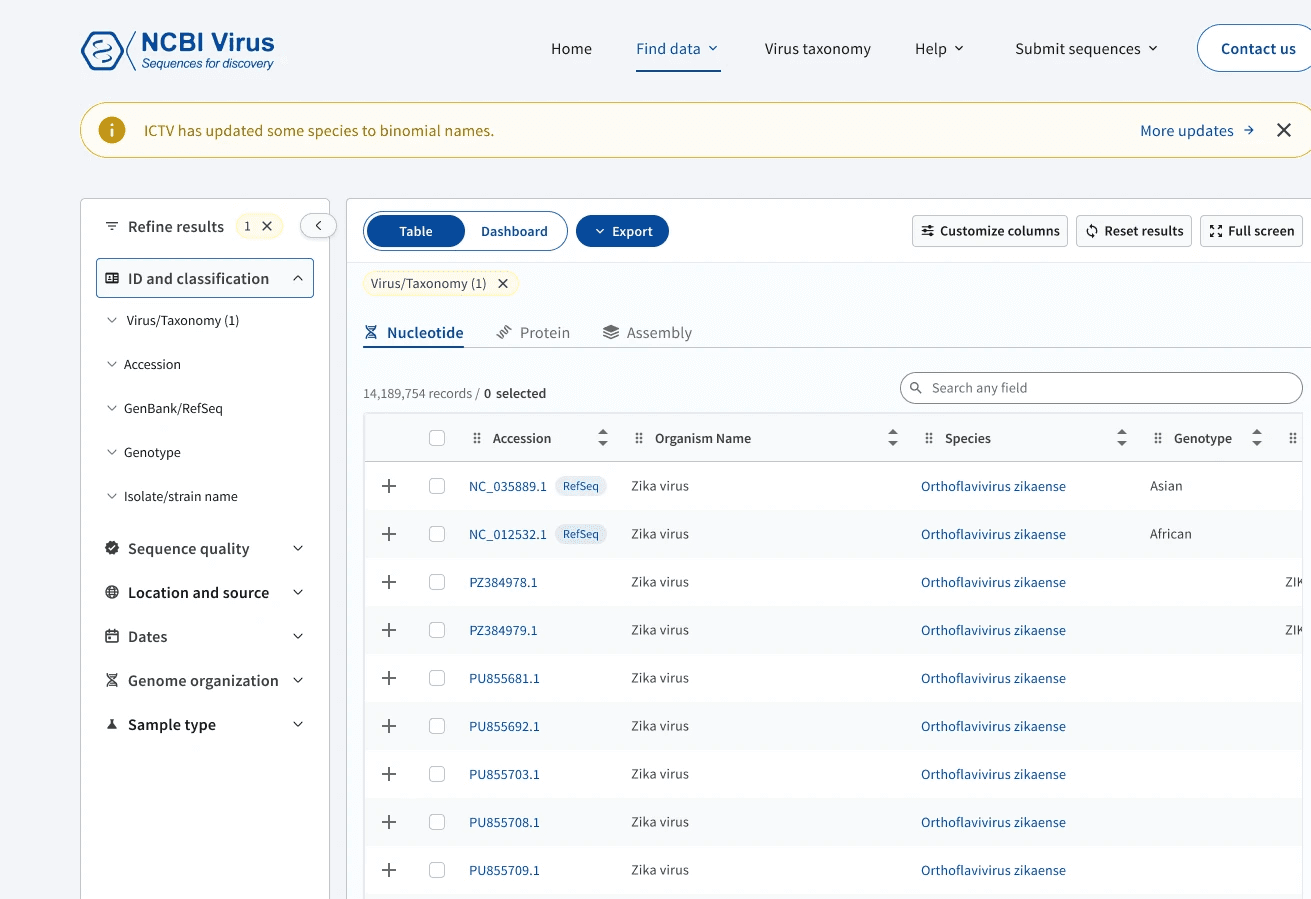
Unused Shortcuts and Details Panel
Shortcut links and a Details Panel ate valuable space, yet most researchers ignored or didn't know about them.

USER RESEARCH RESULTS
Scientists want the most efficient path to filter, analyze, and export their results
User research mapped the typical journey: Filter/Refine Results → Analyze Data → Export. Everything outside that path created friction.
Beyond the issues found in analytics, two further problems surfaced:
04
Unclear functionality for filters and columns:
Researchers didn't understand what filters did, couldn't track which they'd applied, or customize columns easily.
05
Export process confusion:
Too many export options, none transparent about the steps users were taking.


Unclear filters, hidden export, and no universal search
SUCCESS METRICS
Better filter organization, streamlined exports, and reduced support requests
We defined three measurable goals based on the problems we discovered:
01
Better filter organization and discoverability
Filters grouped and ordered in ways that match researchers' mental models, allowing people to find the right filters faster.
02
Streamlined download process
Researchers can navigate through download options more efficiently.
03
Reduced support requests about filters
Reduced support requests about filter location, understanding their functionality, and download processes including bulk download and programmatic access.
DESIGN EXPLORATION
Side panel versus in-column filtering for Results Table
I considered two approaches for organizing the overwhelming filter system:
01
Remove the filter panel entirely and allow people to filter directly within table columns.
02
Keep the filter panel but organize filters based on importance or logical groupings that make sense for researchers.
After aligning with devs, SMEs, and the PO, we chose Option 2 (a vertical filter panel). This layout accommodates non-column filters and matches researchers' existing habits. We also added a universal search box for rapid virus discovery.
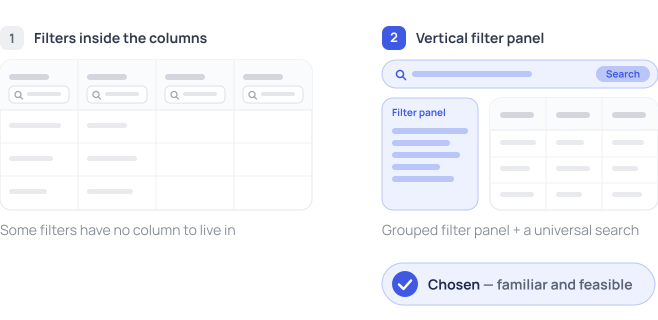

Filter placement options
DESIGN SOLUTIONS
Implementing intuitive filters and columns, clear exports, and focused workspace
I proposed four key improvements based on our research findings:
01
Fixed the filter chaos: Grouped and ordered filters by usage; renamed them to match researchers' mental models with inline explanations and help links; added applied-filter tags above the table.
02
Reorganized columns: Ordered by researcher priority; draggable to reorder in both the table and the selection menu.
03
Streamlined export process: Renamed "Download" to "Export," moved it to the first action position, and made the export steps transparent before clicking.
04
Cleaned up the interface: Removed unused shortcuts, added full-screen mode, and moved Sequence Details to a "+" cell so the accession link works as expected.
Explore the key design decisions
LEARNINGS
Designing value within technical constraints
Clearer naming and contextual help successfully guide researchers to more effective data discovery. The experience taught me to design within tight technical constraints while still delivering value.
OTHER WORK
Unifying the dashboard experience for scientific researchers
Making sense of data through visualizations